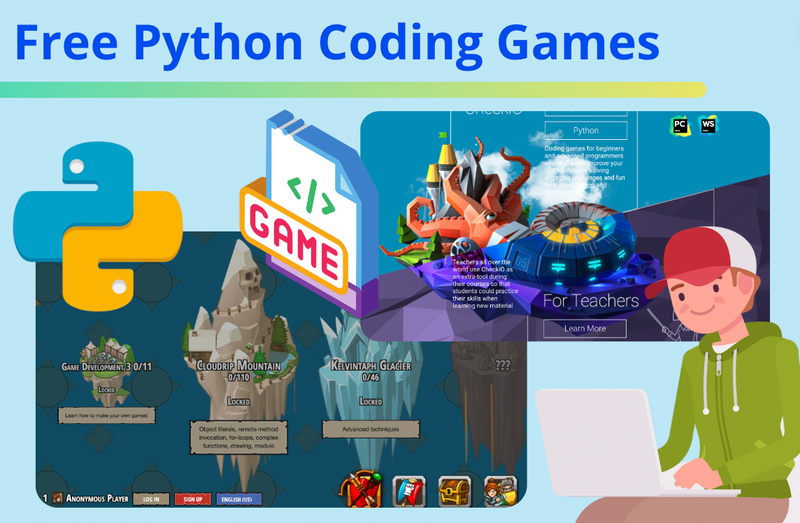
Learning Python for kids doesn't have to be a chore of memorizing syntax and typing endless lines of text. We have curated the best Python coding games to play and learn, as well as the top game projects students can build from scratch.
Python is an essential programming language in the industry and is popular for applications like artificial intelligence and web development. It is also the best starting point for students learning text-based coding and is the primary language used in high school AP Computer Science courses. A fun, game-like approach can make the process far more engaging, especially for beginners. Buckle up and get ready to explore Python Coding Games which are as exciting as it is educational.
The best way to take the very first step of learning Python is to take a free online Python coding classes with live expert guidance, for grades 5 and above, designed by professionals from Google, Stanford, and MIT.
Python Coding Games - Play vs Create: Which is Best Path for You?
Before diving in, it is important to understand the two ways kids engage with coding games with Python.
Games to Play (Instructional Platforms, learn by playing games specifically designed for learning Python): Python Coding Games gamify the process of learning Python. Students learn foundational coding concepts such as syntax, variables, and functions, while earning in-game awards as they answer questions correctly. The awards can be used to upgrade characters, unlock new maps, and more. In some games, the Python code may control game characters directly to move, battle, and interact.
This approach is very similar to Duolingo, except that players are learning Python programming language, as opposed to a spoken language. Python learning games transform the education process into a journey of quests, challenges, and virtual rewards.
Games to Make (Project-Based Learning, code Python projects that are games as part of the learning): Another fun way to learn Python is by coding Python games, i.e. creating Python projects that are games. There are plenty of easy, fun game projects that can be coded with Python. Create & Learn’s Python Coding Class for kids and teens includes a variety of fun game projects such as guessing games and Battleship. This Python Skill Builder also has a rich collection of game projects.
For intermediate Python learners, PyGame is a library built on top of Python and can be used to develop more advanced games with graphics, sound, and highly interactive game elements.
Top Python Games: Gamified Learning
Python, one of the most sought-after programming languages, is an excellent starting point for beginners in middle and high school. Python coding games are popular among beginners. Studies show that gamified learning can boost student engagement by up to 60%. We will guide you through some top Python coding games–from interactive Python coding platforms tailor-made for beginners to websites that allow learners to practice Python skills through engaging games, find everything you need.
1. Code Combat
Ages 9+, Online

Code Combat transforms learning Python into an adventurous game. Its game approach makes it popular for kids. Users navigate through different worlds and levels by writing actual Python code. It integrates education with entertainment, making it ideal for learners who thrive in engaging, gamified environments. You might be wondering:
- What they learn: Syntax, arguments, strings, and loops.
- Is any prior coding knowledge required for Code Combat? No, prior coding knowledge is not required to start with Code Combat. The platform is designed to introduce beginners to the world of coding in a fun and interactive manner.
- How does Code Combat coding games work? Its interface is designed like a real video game where players use Python code to control characters to navigate around and complete various tasks. Rewards earned along the way can be used to upgrade characters and unlock new maps or features. Because the gameplay ties coding directly to in-game actions, the learning experience is less traditional to support this approach. For example, object-oriented programming is introduced in the very first exercise. In most Python curricula, this concept appears much later.
Pricing - Start free. Full access is $9.99/month per student.
2. Create & Learn's Python Skill Builder
Ages 10+, Online
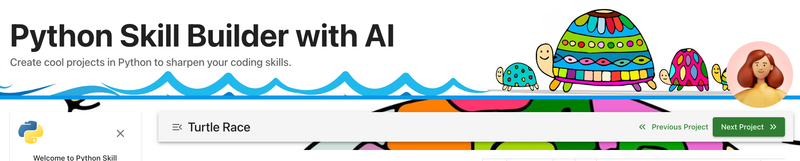
Create & Learn’s Python Skill Builder represents a new type of Python learning tools where an AI Coach powered by ChatGPT can assist with any questions that learners might have, making it much more interactive and easier to learn. It includes a series of 20 Python projects—a good number of them are about building games. Students begin with basic Python syntax challenges, then move on to engaging animation and other creative projects. Ask questions and get immediate answers from your AI Coach, if you need help along the way.
- What they learn: Build fun projects, problem-solving, debugging, and AI interaction.
- Is Python Skill Builder beginner-friendly? Yes—it’s designed specifically for beginners. However, its purpose isn’t to teach Python step-by-step from scratch. Instead, it is a companion tool to classes, books, even Python learning games, by giving students more opportunities to practice Python concepts, develop problem-solving skills through coding, and build larger projects step by step. The projects are organized to align with popular Python curricula, starting with simple concepts and gradually increasing in difficulty.
- Is Python Skill Builder for kids and teens? Absolutely. It’s specifically tailored for middle and high school students, with projects that are both fun and age-appropriate. Every activity is designed to keep learners engaged while helping them strengthen their Python skills.
Pricing: Completely free for Python for AI class students. The first 3 projects are free for everyone. $20/year ($10/year after promotion)
3. CheckiO
Ages 12+, Online

CheckiO is another fantastic resource for Python coding games. It’s an interactive and competitive platform where learners can improve their coding skills through Python challenges. Its key features include a community of coding enthusiasts where learners can collaborate, making it an interactive learning space. You might be wondering:
- What they learn: Algorithms, efficiency, and list comprehension.
- Is CheckiO suitable for beginners in programming? CheckiO does cater to beginners, but it's more appreciated by those who have some initial understanding of Python. The challenges start at an easy level but quickly escalate in complexity, encouraging continuous learning.
- Is CheckiO appropriate for children? While CheckiO can be a valuable tool for older children interested in programming, the complexity of some problems might make it challenging for younger children. It's best suited for high school students and adults.
Pricing - Free can go pretty far. There is a subscription option of $2.99/month.
Quick Comparison: Top 3 Python Game Platforms
| Platform | Best For | Ages | Coding Style | Pricing Model |
|---|---|---|---|---|
| CodeCombat | RPG/Adventure Lovers | 9+ | Python/JS (Text) | Freemium / Subscription |
| Python Skill builder by Create & Learn | AI & Structured Learning | 10+ | Project Based Learning + AI Coach | Entirely Free for students of Python for AI class (Freemium for rest) |
| CheckiO | Puzzle Solvers | 12+ | Python (Text) | Freemium / Subscription |
4. Codewars
Ages 13+, Online
For those seeking more competitive Python programming games, Codewars presents real coding problems in a karate-themed game. Its community-based approach allows learners to improve through collaboration, making it an excellent choice for enhancing problem-solving and coding skills. You might have some questions such as:
- Is Codewars only for experienced programmers? While Codewars does offer advanced coding challenges, it's not only for experienced programmers. The platform provides 'kata' or challenges across various difficulty levels, making it suitable for beginners as well.
Pricing - Free tier available. Subscription $5/month
5. MIMO
Ages 12+ Apps and Online
With more than 10 million downloads on Google Play alone, MIMO is a popular platform for learning a variety of coding languages, including Python. Its gamified approach is very similar to Duolingo, where programming topics are broken down into small, interactive, bite-sized lessons. Users can set how much time they want to spend on coding each day, and earn points, badges, and streaks to build learning habits.
MIMO covers a broad range of topics—from beginner fundamentals to advanced concepts—preparing learners who are interested in pursuing coding-related jobs. While its primary audience is adults, its easy-to-use design makes it a helpful learning tool for motivated high school students as well.
Pricing - Free to start. Subscription is $12/month
6. CodeMonkey
CodeMonkey is a gamified coding platform started as a program for younger kids. However, it does offer a Python learning game as well called Banana Tales. In this game, students write Python code to help a monkey drive a car, clear obstacles, and collect bananas.
You might be wondering:
- Is CodeMonkey just for little kids? While the early levels use CoffeeScript for younger children, the Banana Tales and Coding Chatbots courses are specifically designed for middle schoolers (Grades 6-8). They teach complex Python concepts like lists, loops, and dictionaries in a way that feels like solving a puzzle rather than sitting in a classroom.
Pricing - 7 day free trial, after that, individual plans start at approx. $7/month (billed annually).
Fun Python Games You Can Build Today
Once you have understood the basics, the real fun begins: making your own Python games. Coding fun Python projects like games teaches is a fantastic way to practice coding concepts and how to do problem solving with code, and makes learning fun! Here's some example projects you could consider. We will show two fun game projects in detail below or follow the link here to check out more Python game projects.
- Text-based adventure: This is a classic and simple starting point. It reinforces understanding of variables, control flow, and user input.
- A quiz game: Quizzes can vary in complexity. They can range from simple trivia games to complex systems with scoring and multiple choice options.
- A Tic-Tac-Toe game: This will challenge you to work with arrays and loops.
- A simple Pong game: Here, you'll begin to use libraries like Pygame. This is a bit more advanced, but very rewarding!
Check out even more Python project ideas here. There are countless resources online to help you get started on these projects. One key piece of advice? Don't worry about making your games complex or flashy. Focus on making them work, and have fun in the process!
Hogwarts Sorting Hat Game (Python Beginner Level)
Step into the magical world of Python coding with this fun “How to Code a Game in Python: Hogwarts Sorting Hat”! Bring to life a digital Sorting Hat that asks questions, thinks, and helps you find the best spot—just like at Hogwarts.
Code Cave Escape Python Game (Beginner Level)

Explore a mysterious cave filled with hidden treasures and unexpected surprises. Navigate the twists and turns, avoid lava pits, and find the exit! Join the adventure and see if you have what it takes to become the ultimate cave explorer! This is one of a collection of Python Projects that you can create with assistance from AI to sharpen your Python coding skills!
Python Coding Competitions or Challenges
Want to test your Python skills? Participating in Python coding competitions or challenges is a great way to do so. These events are not only exciting, but they can help improve your problem-solving skills and potentially provide recognition for your coding abilities. Some popular platforms hosting these challenges include:
- HackerRank: This platform is great for practicing a wide range of Python problems. They even have a 30-day coding challenge to improve consistency and discipline.
- W3Schools: This free platform provides interactive exercisess and tutorials for Python.
Remember, the aim is not just to compete, but to learn and grow. Don't feel disheartened if you can't solve a problem. Learn from it and move on to the next! Explore more coding contests for kids here.
Python Game Libraries - PyGame and More
In Python, libraries are sets of modules, functions, and methods that allow you to perform many actions without writing your own code. When it comes to game development, these libraries can be invaluable. Two commonly used Python game libraries are:
- Pygame: This is probably the most well-known library for making games in Python. Pygame provides functionality for creating 2D games, with easy-to-understand methods for handling game elements like graphics, sound, and user input.
- Arcade: Arcade is another Python library, praised for its simplicity and consistency. It's especially suitable for 2D video games and for beginners who are new to game development.
Before jumping into game creation, spend some time exploring these libraries. Check out the advanced Python class to learn more about PyGame.
Online Python Coding Courses with a Gaming Element
Learning to code doesn't have to be a solitary or monotonous activity. Online Python coding courses often incorporate gaming elements to make learning more enjoyable and engaging. Here are a few to consider:
- Create & Learn (Python for AI Class): This online class is led by an expert instructor, and covers not only the basics of Python coding for kids and teens, but also puts a strong focus on the elements of Python that are most relevant to Artificial Intelligence, including data structures and libraries. This is the perfect small group class to get started, and the curriculum is designed by experts from Google, Stanford, and MIT. There's even a free Python intro class to begin.
- Create & Learn (Advanced Python - Vibe Coding with AI): Designed for students who have mastered the Python basics, this new course introduces the future of programming: "Vibe Coding" to young learners. Students learn to code collaboratively with AI, building far more complex projects much faster while learning along the way. The curriculum also covers advanced concepts like sorting algorithms, web scraping, API integration, and recommendation systems. Among other projects, we will be building games with PyGame.
- Codecademy (Learn Python 3): Codecademy's Python course offers interactive video lessons and projects, as well as quizzes to reinforce learning.
- Coursera (University of Michigan's Python for Everybody): This on-demand video course offers a comprehensive introduction to Python with plenty of exercises and projects. It takes 8 months to complete and includes a certificate, so is best for students that can hold themselves accountable.
- Udemy (The Python Mega Course: Build 10 Real World Applications): This course includes 52 hours of on-demand videos, and allows students to learn Python by building several applications, turning the learning process into an exciting journey.
Each course is structured differently, so choose the one that fits your student's learning style best. Remember, the goal is to enjoy the process of learning, so find a course that's not just informative but also engaging!
Explore Free Python Games
Discover fun free Python games to try to build your skills.
1. First Interactive Program with Python on trinket.io
This is an excellent first project to create if you are a beginner who is interested in learning about Python. This project includes powerful methods like listen() and click() which can trigger events like the change of color of a Sprite and screen. It also includes familiar features like “go to” (goto()) method where x and y axis of a Sprite can be changed based on a given condition and/or function. If you are familiar with Scratch, this project will give you an idea of how Scratch and Thunkable blocks work behind the scenes.
2. React to Click and Key Events using Python on trinket.io
We are fans of trinket.io – the pioneer of today’s interactive modules and a popular platform that allow users to create simple but powerful interactive projects with Python. In this game, titled “Turtles in Space”, you can continue to learn about listen() method and get an idea of how a game can react to not only clicks, but key events as well (keyboard keys). Much like Scratch, this exercise shows you how events are triggered based a key that’s pressed by a user. This is another amazing feature derived from the listen() method in Python.
3. The 21 Game with Python on trinket.io
This is a human versus computer game where the computer picks and outputs a
random number using Python’s random module. Then the game prompts the user to input numbers 1, 2, or 3 which adds on to the random number that was previously picked. The goal for the user is to avoid inputting a number that will, when added, exceed 21. In the meantime, the program behind The 21 Game is set to check for the winner using logic like if/then/else conditions and while loops.
Get Started Making a Simple Game in Python
Let's start off by making a simple game in Python. To help you get started, we have put together a step-by-step tutorial for a simple Python game we call Write a Message.
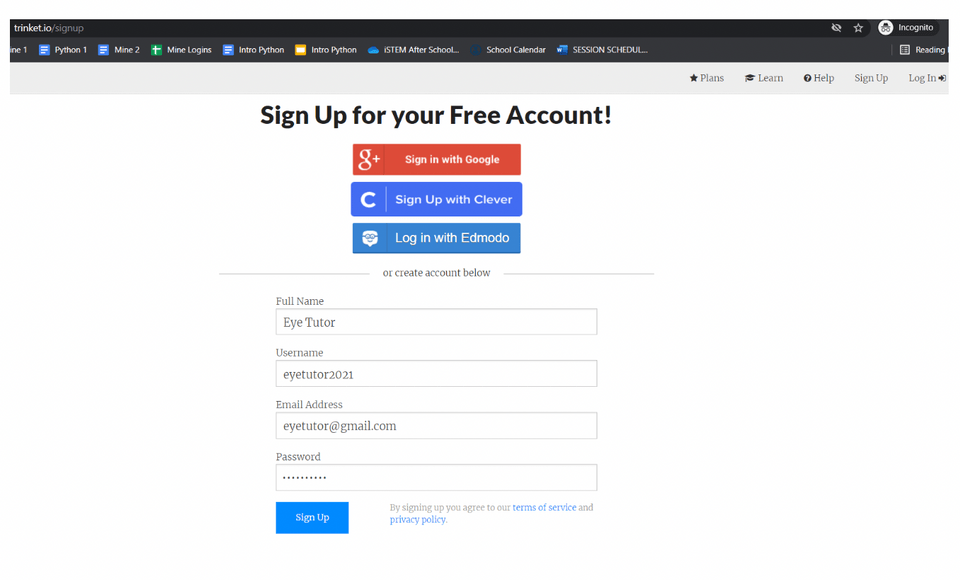
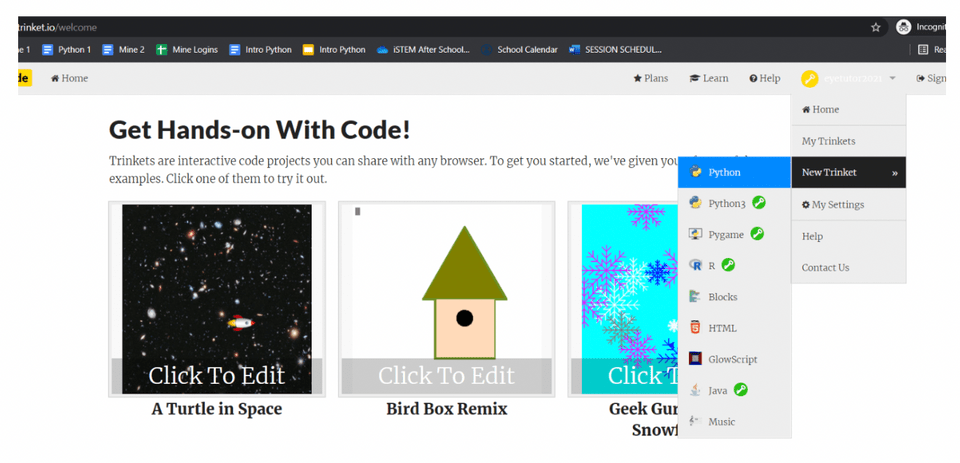
STEP 1: Sign up or log into Trinket.io
If you haven’t already, create an account on trinket.io by going to trinket.io/signup then hover over your name in the upper right corner and select “New Trinket” and then “Python”.
STEP 2: Overview and Helper.py File
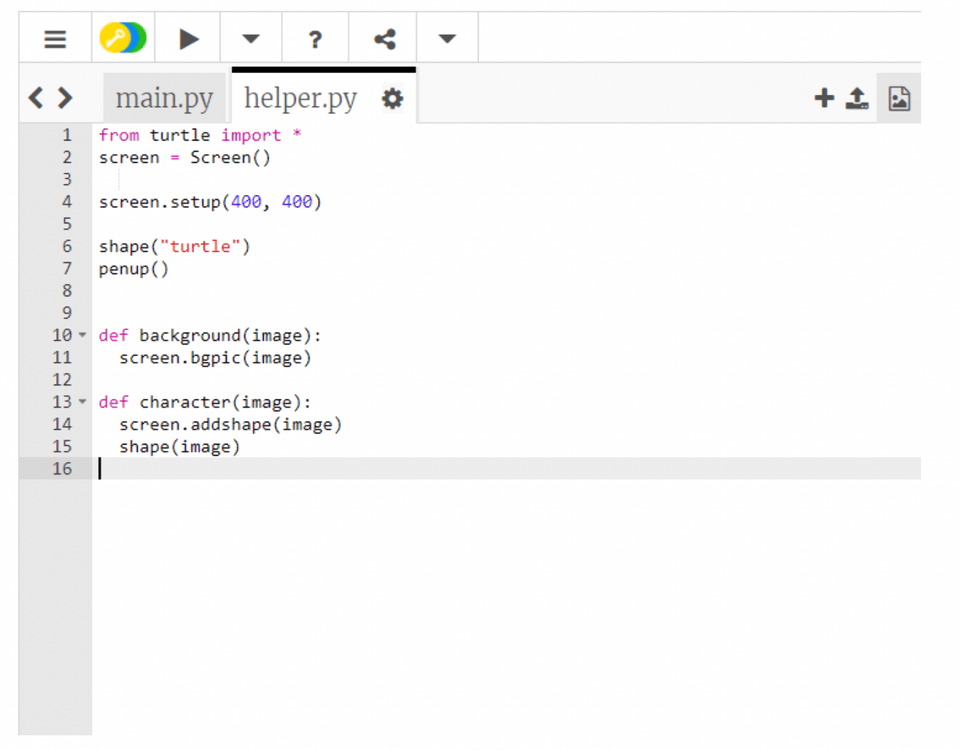
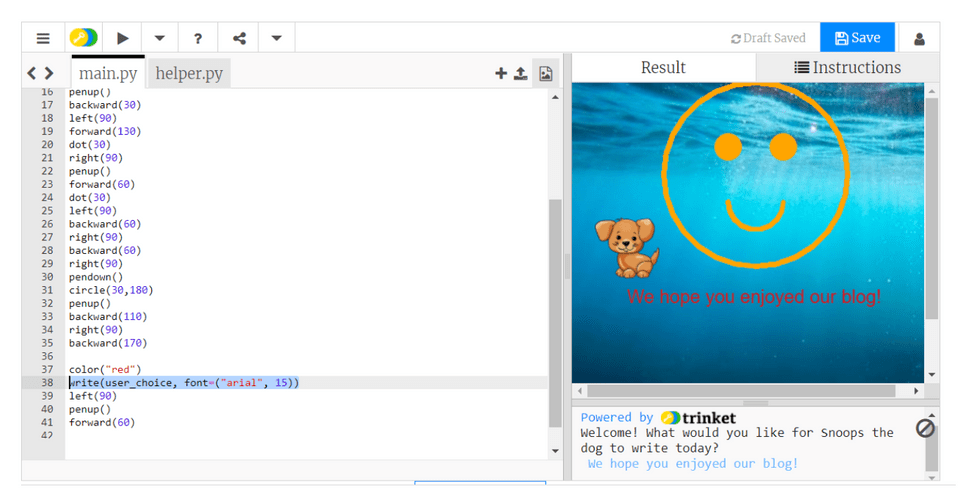
We want to add a background and a character “Snoops the dog” who is going to brighten up our day by drawing a simple smiley face and writing a message of the user’s choice at the bottom of the page.
Helper.py file will be used for importing the turtle module which allows for graphic-like designs. Inside of Helper.py file we’ll define the background and the image which we will pull into the main file where we will write our code. To add a text file, click on the plus sign on the top right and enter the following text:
STEP 3: Set the Background and the Character
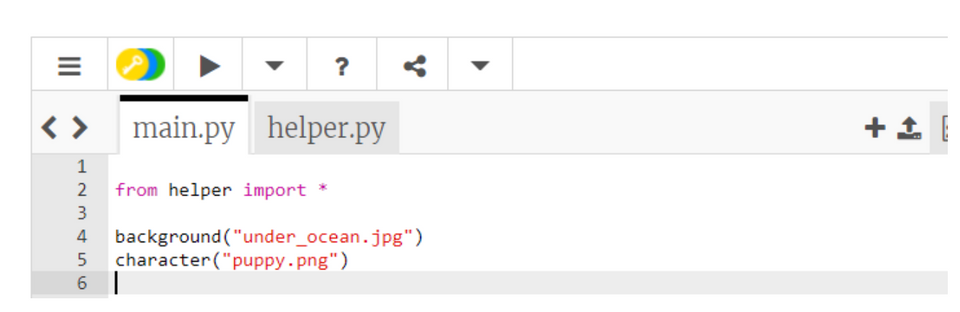
Click on the main.py tab and start with importing the helper file that we created previously. Both the background as well as the character are an image type of a document, we just need to type out their exact file names inside of the parenthesis. Don’t forget the double quotes around each. To see what it looks like so far, click on the right pointing triangle icon right above the main.py and helper.py tabs.
STEP 4: Instruction Line and User Text Input
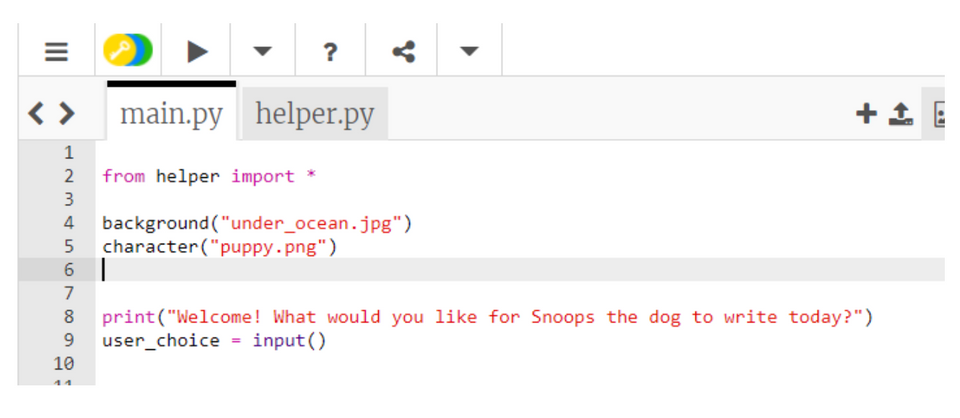
Let’s print a message to the users before Snoops the dog gets to work. Use print() and enter the text of your choice to prompt the user to enter what they’d like to see at the bottom of the screen. Then create a variable where the user’s input will be stored. We named our variable “user_choice”:
STEP 5: Snoops the Dog Drawing
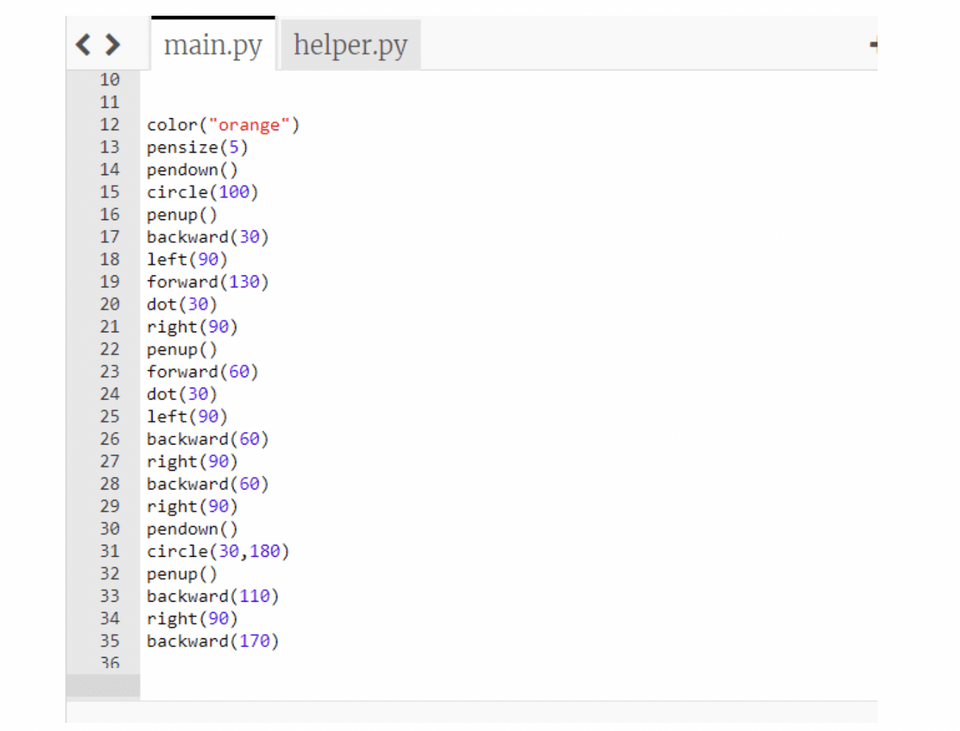
Much like the blocks in motion category on Scratch coding, Python has something similar. The syntax is different, but functions are the same. For example, if you noticed Snoops the dog is currently sideways, that can be corrected by using left() or right() method.
We can also draw using the pendown() method and stop writing with penup() which may seem familiar if you’ve used the Pen extension in Scratch. The forward() and backward() methods move our character back and forth and circle() method can be used for circular motions. For drawing, the thickness of the line can be controlled with the pensize() method:
STEP 6: User’s Message
All there is left to program is the part where Snoops the dog will write the message that was typed up. Python uses write() method to output any text, or in our case, the text (message) that was stored inside of our user_choice variable:
Try Free Python Coding Games Today!
Python is not only one of the most in-demand programming languages in today's digital age, but its mastery can also be an enjoyable and enriching journey. Take advantage of the myriad resources available. Experiment with different platforms, challenge yourself with increasingly complex coding puzzles, and, above all, remember to have fun in the process. For those seeking a more structured learning experience that sets students up for success, consider taking a course like the Python Introduction for Kids & Teen - an award-winning interactive class that teaches Python through engaging coding projects.
You can also explore more free Python resources for kids online, and get your student started with an interesting Python for loops tutorial.
Remember that learning to code isn't a sprint, but a long hike. Enjoy each step, celebrate your progress, and before you know it, you'll be tackling Python projects with confidence and ease. Let the games begin!