

The word “algorithm” is often used a lot with respect to computer science and programming. Or you might hear the term algorithm when talking about TikTok and other forms of social media. But, what exactly is an algorithm? The word may sound complicated, but the concept is relatively easy to understand even without a coding background.
In this article, we’ll examine algorithms, learn how to create them, and discuss real-life examples. When your child is ready to learn even more about algorithms, enroll them in an award-winning free live online AI event for kids, designed by experts from Google, Stanford, and MIT.
What is an algorithm?
Simply put, an algorithm is a set of steps used to solve a specific problem. You may think of it as a "step by step process towards solving a goal". While algorithms often appear in computer science or coding contexts, an algorithm can be as straightforward as making a peanut butter and jelly sandwich. or brushing your teeth. Once you’ve written out the steps for making a PB&J, you can use this same algorithm every time you want to make a new one, and you can share your algorithm with other, hungry people.
What are algorithms in coding?
Algorithms in coding are still a step by step process towards a goal, but now they involve lines of code. These lines of code, built into blocks or functions, that can solve programming or mathematical problems. They may be written in any language, algorithms are a concept not a language specific item. For a piece of code to be considered an algorithm, it must consistently produce the right solution and must be guaranteed to work on reasonable inputs. Algorithms in coding may be simple methods that can search for information or sort lists. More complicated algorithms can be used for artificial intelligence, data science, and more!
Coding algorithms are especially useful because they can solve big problems much more quickly than humans can. In fact, certain problems that are too complex to solve mathematically can be solved with algorithms.
An algorithm in coding example
Below is a simple example of an algorithm, written in Python:
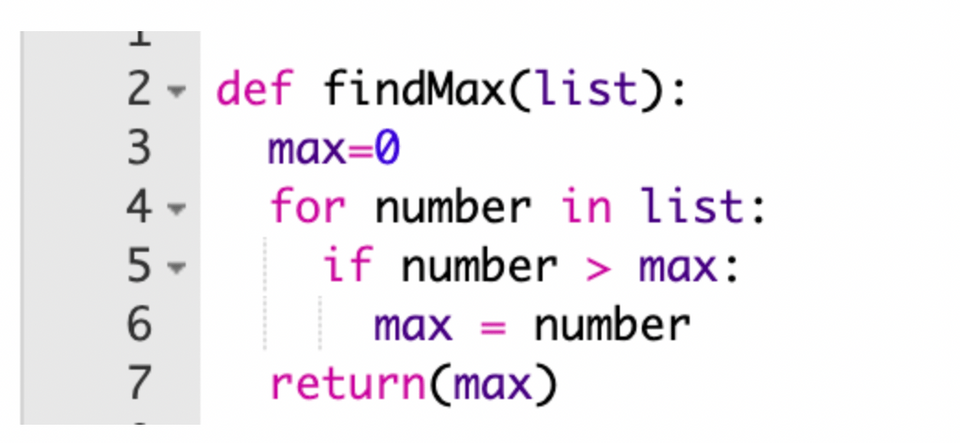
This example creates a function, findMax(), which finds the biggest number in a list of numbers. Essentially, this algorithm looks at every number in the list and if the next number is bigger than the current maximum value, sets the maximum value to the bigger number. This algorithm is guaranteed to work, even on a very big list.
You may think about this also in terms of how would you solve the problem of finding the maximum number in a large list of numbers. You may not realize it but you would be searching the list to keep finding a larger number. As that list gets bigger, it will become more difficult. This is where a coding algorithm would be helpful.
Another common problem that may be solved with algorithms is the Traveling Salesman problem. In this challenge, the objective is to find the shortest path between multiple cities. While this problem can be extremely complicated to do “by hand” when there are a large number of cities, computer algorithms can solve it very quickly!
There are some computer algorithms you likely use every day. Facebook, Instagram, Twitter, and many other social media platforms rely on algorithms to serve you relevant posts and recommend other content. Google Search sits on a powerful algorithm which helps you find specific information among the billions of pages of the internet.
Algorithm examples in everyday life
We apply algorithms in real life without even thinking about it. We’ve listed some examples below.
Baking a cake
The process of baking a cake (or any other similar baked good) can be broken down into gathering ingredients, preheating the oven, mixing wet and dry ingredients together, filling a cake pan, and then baking until done. This type of algorithm could be documented in a cookbook, or an online recipe site.
Tying your shoes
Tying your shoes is an algorithm that is likely so automatic you don’t even think of the steps as you do them. Many routines or habits are algorithms, as they can be broken into steps that you repeat every time you need to complete the task. If you look at kids activity book for tying shoes, you may find the steps broken down even for young learners.
Driving a car
Learning how to drive a car means learning lots and lots of rules of the road. Most of the actions we perform as we drive can be thought of as algorithms. The proper process for moving through a four-way stop, changing lanes, and even parking all have a set of specific steps that make them algorithms.
What other examples can you think of?
Types of algorithms
The most basic types of computer science algorithms are:
- Brute force algorithms:
Target Age Suitability: Ages 8+ (Elementary to Middle School)
A brute force algorithm is the most straightforward, direct way to solve a problem. It relies on sheer computing power rather than clever shortcuts, trying every single possible option until it finds the correct answer.
Example: Imagine you forgot the 3-digit combination to your bike lock. A brute force algorithm would start at000, then try001,002,003, and so on, all the way up to999until the lock pops open. - Backtracking algorithms:
Target Age Range: Ages 13+ (Middle to High School)
Backtracking is an incremental approach to solving puzzles and logic problems. Instead of trying every combination from scratch, a backtracking algorithm builds a solution step-by-step. If it hits a dead end where a rule is broken, it "backtracks" to the previous step, undoes its last move, and tries a different path.
Example: Programming a virtual robot to navigate a maze. The robot goes straight until it hits a wall, then backs up to the last intersection to try the other direction. - Divide and conquer algorithms:
Target Age Suitability: Ages 11+ (Middle School)
A divide-and-conquer algorithm breaks a complex problem down into smaller, identical subproblems, solves those subproblems individually, and then merges their results back together to get the final answer.
Example: If you want to find a word in a printed dictionary, you don't look page-by-page. Instead, you open the book right in the middle. If your word comes earlier alphabetically, you ignore the entire right half, split the remaining left half in two, and repeat the process until you find the word. - Dynamic programming algorithms:
Target Age Suitability: Ages 15+ (High School, AP Computer Science)
Dynamic programming is a highly optimized way to solve complex mathematical and computational problems. It works by breaking a problem down into overlapping subproblems, solving each subproblem only once, and saving the answer in memory (a process called memoization) so the computer never has to calculate the same thing twice.
Example: If your teacher asks you what1 + 1 + 1 + 1 + 1is, you count them and say "5". If the teacher adds another+ 1to the board and asks for the new total, you don't recount from the beginning. You remember "5" from before, add 1, and quickly say "6". Dynamic programming is simply your code remembering its past work to save time. - Greedy algorithms:
Target Age Suitability: Ages 10+ (Middle School)
A greedy algorithm solves a problem by making the absolute best, most immediate choice available at each step, without worrying about how that choice might affect future steps. While it does not always find the absolute perfect overall solution, it is incredibly fast and often gets very close.
Example: If you need to give a customer 41 cents in change using the fewest coins possible, a greedy algorithm always grabs the largest coin that fits first (a quarter, leaving 16 cents), then the next largest (a dime, leaving 6 cents), then a nickel (leaving 1 cent), and finally a penny. - Randomized algorithms:
Target Age Suitability: Ages 9+ (Elementary to Middle School)
A randomized algorithm uses random numbers or chance as a core part of its logic to decide what to do next. It is highly useful in scenarios where trying to calculate a perfect, deterministic path would take too much time or code.
Example: Programming an opponent in a rock-paper-scissors game to pick a random hand, ensuring the human player can't easily predict its next move. - Recursive algorithms:
Target Age Suitability: Ages 12+ (Middle to High School)
A recursive algorithm is a function that calls itself to solve smaller versions of the same problem. To prevent running forever, every recursive algorithm must have a "base case"—a specific condition that tells the program when to stop calling itself and start returning answers.
Prerequisite Warning for Students: Always define your base case first! Without it, your recursive code will trigger an infinite loop, causing your computer to run out of memory and crash with a "stack overflow" error. - Sorting Algorithms:
Target Age Suitability: Ages 10+ (Middle School)
Sorting algorithms organize unsorted data into a specific order, such as alphabetical or numerical. Common types include Bubble Sort (swapping adjacent items until sorted) and Insertion Sort (building a sorted list one item at a time, much like sorting a hand of playing cards).
Example: A physical classroom activity where students line up by height using only side-by-side comparisons to experience how computers sort lists.
Where are algorithms used in computer science?
Algorithms are the building blocks for programming. Today, algorithms allow computers, smartphones, and websites to function and to make decisions. As just one small example, if you use apps such as Facebook and TikTok, the algorithms on those platforms help chose the content that gets shown to you.
How do you write a code algorithm?
The process for writing an algorithm can be broken down as follows:
1. Write it in human-language.
Write the algorithm out in human-language or as a flow chart. Don’t try to code your algorithm before you truly understand what it needs to do. Spend some time figuring out the process and all the different cases your algorithm may need to handle.
2. Pseudocode.
Break your process into very specific steps, still in human-speak. We’ll later translate these steps into a programming language. Often, this can be done as comments in your coding environment. Having a good frame for your algorithm will make it that much easier to code.
3. Code it!
Using your pseudocode, write out each step in your algorithm in your coding language of choice.
4. Test it.
Test your algorithm. Make sure you try as many different cases as you possibly can, so that your algorithm can handle lots of different types of inputs.
Astute readers will see that the process for writing an algorithm is, in fact, an algorithm.
Definition of an algorithm for kids
By now, you know more about algorithms, how they are used in real life and in computer science, and how to code a basic algorithm. As you can see algorithmic thinking can help children develop lifelong logic thinking skills. If your child is interested in learning more, check out our AI Explorers class where we discuss many different types of AI algorithms and how they can be used to teach computers to learn!

